In this article, I will show you how I built a powerful Python-based system that automatically generates and publishes articles to WordPress — completely free and running 24×7.
This project handles everything:
- Finds trending topics
- Writes articles using AI
- Fetches relevant images
- Publishes directly to WordPress
All you need to do is provide keywords.
What This System Actually Does
This is not just a script—it’s a complete automation pipeline.
Once started, the system:
- Scans the internet for latest news and updates based on your keywords
- Uses the Groq API to generate high-quality articles
- Fetches relevant images from Pexels API
- Combines content + images
- Publishes the article directly to your WordPress site
It also includes smart checks like:
- Avoiding duplicate articles
- Filtering low-quality content
- Selecting the best matching images
- Limiting daily article publishing
All of this runs automatically in the background.
How the System Works (Core Flow)
At a high level, the pipeline works like this:
Keywords → News/Data Fetch → AI Article Generation → Image Fetch → Combine → WordPress Publish
The system continuously loops through this pipeline and keeps generating fresh content.
Step 1: Project Folder Structure
To avoid errors, you must follow the exact folder structure below:
ai/
    writer.py
media/
    image_fetcher.py
publisher/
    wordpress.py
research/
    article_scraper.py
signals/
    signal_sources.py
    topic_cluster.py
    topic_selector.py
sources/
    company_updates.py
    github_trending.py
    rss_scanner.py
    x_updates.py

ai_news.log
articles.db
config.py
database.py
main.py
scheduler.py
test_groq_models.py
test_wordpress.py
This structure ensures that each component works independently but integrates smoothly.
Step 2: Get Your Groq API Key
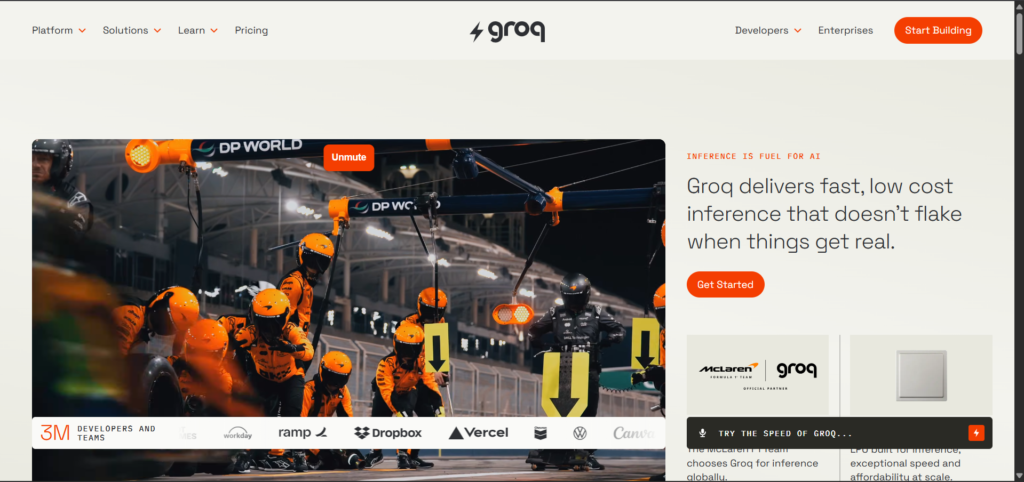
- Go to groq.com
- Click on Start Building
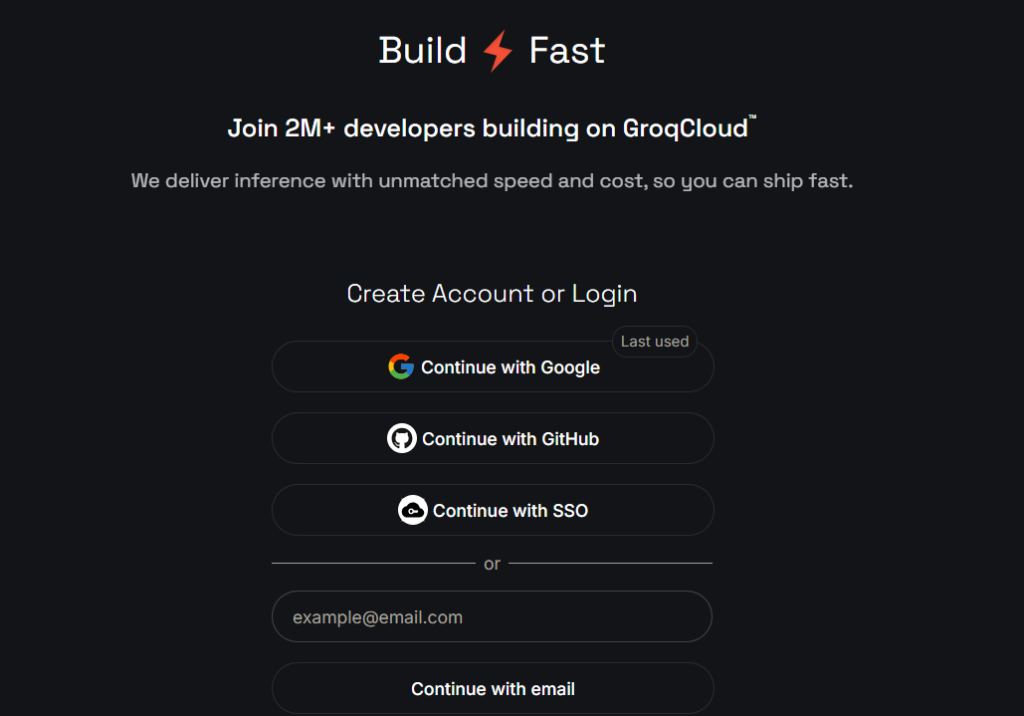
- Sign up or log in
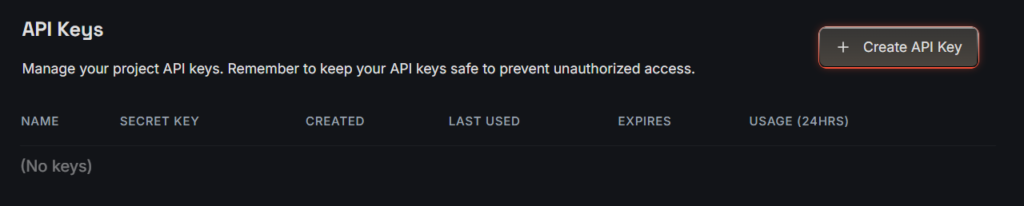
- Navigate to API Keys
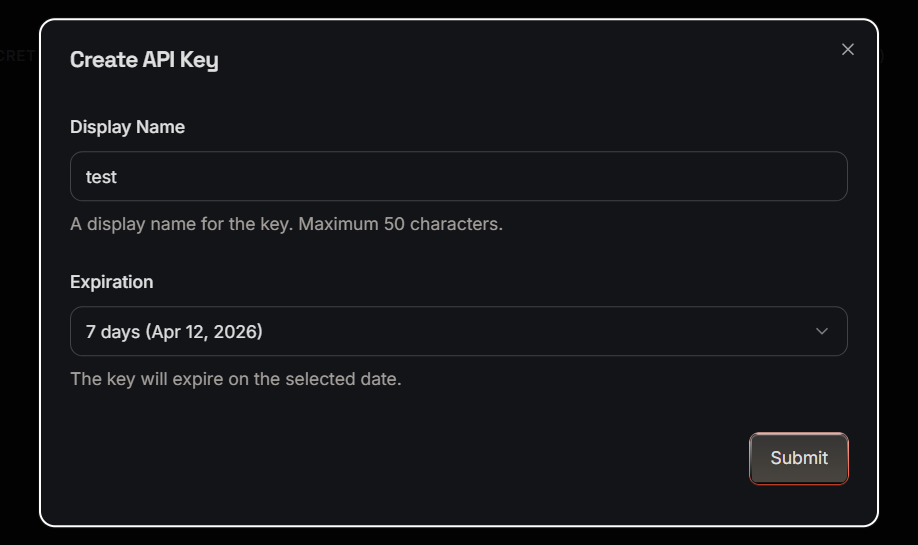
- Click Create API Key
- Enter the Display Name and select expiry date
- Copy the key
- You are done
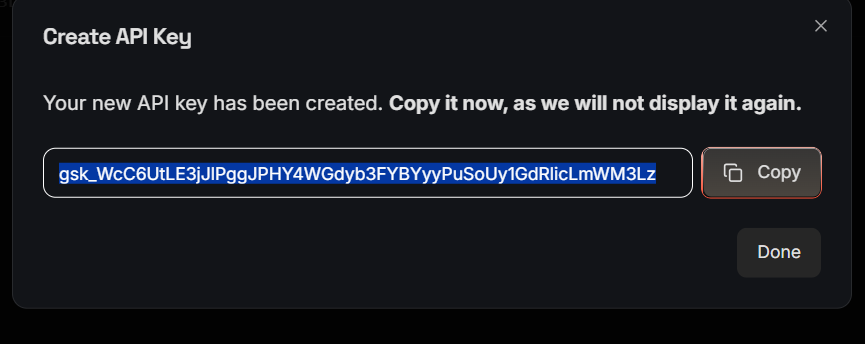
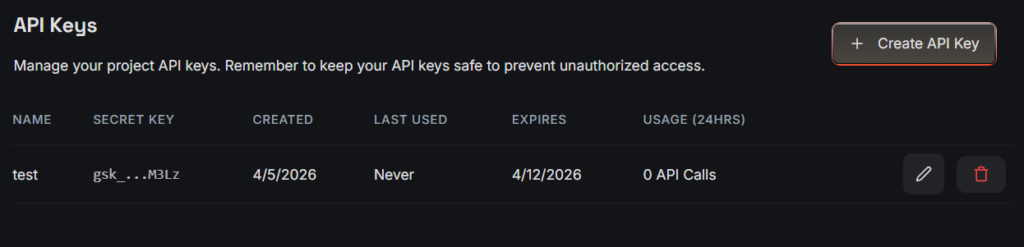
Add this key to your config.py file.
Step 3: Get WordPress Application Password
To allow Python to publish posts:
- Go to your WordPress Dashboard
- Navigate to: Users → Profile
- Scroll down to Application Passwords
- Click Add New Application Password
- Copy the generated password
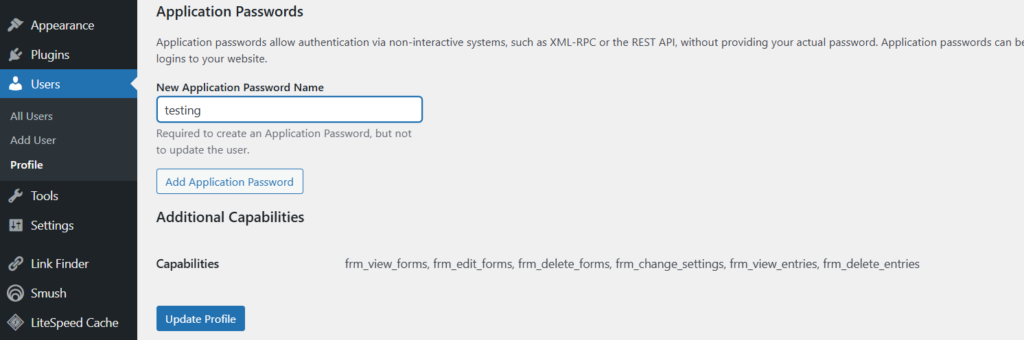
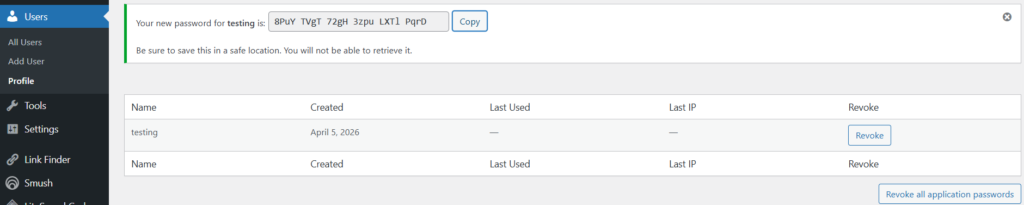
Update this in your config.py.
Step 4: Get Pexels API Key
- Visit pexels.com
- Log in
- Go to Image & Video API
- Click on Your API Key
- Fill all the required fields and click Generate API Key
- Copy it
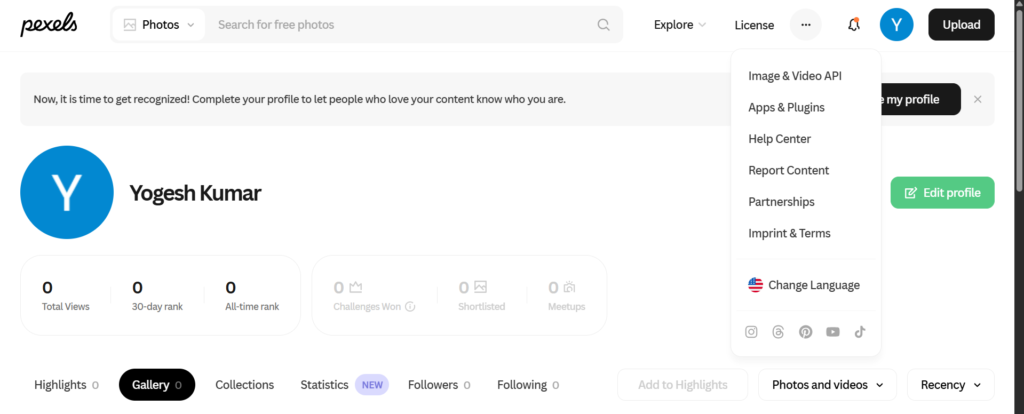


This key will be used to fetch featured images.
Step 5: Configure config.py
Add all your API keys and credentials here:
GROQ_API_KEY  = "your_groq_api_key"

WORDPRESS_URL = "https://copyassignment.com/wp-json/wp/v2/posts"
WP_USER = "wordpress_user_name"
WP_PASSWORD = "password something like this-> iCAm us41 iCdG hd5r y2yK 9Zbm"

MAX_ARTICLES_PER_DAY = 10

# inside tech feeds, paste url of feeds/rss you want to fetch article/news from

TECH_FEEDS = [
    "https://arstechnica.com/feed/",
    "https://www.wired.com/feed/rss",
    "https://www.theverge.com/rss/index.xml",
    "https://www.zdnet.com/news/rss.xml",
    "https://www.cnet.com/rss/news/",
    "https://www.techradar.com/rss",
    "https://www.digitaltrends.com/feed/",
    "https://www.tomshardware.com/feeds/all",
    "https://www.technologyreview.com/feed/",
    "https://www.infoq.com/feed/",
    "https://thenewstack.io/feed/",
    "https://www.bleepingcomputer.com/feed/",
    "https://www.pcworld.com/index.rss",
    "https://www.theregister.com/headlines.atom",
    "https://www.geekwire.com/feed/",
    "https://spectrum.ieee.org/rss/fulltext",
    "https://news.ycombinator.com/rss",
    "https://openai.com/news/rss.xml",
    "https://huggingface.co/blog/feed.xml",
    "https://blog.google/technology/ai/rss/",
]

PEXELS_API_KEY = "your_pexels_api_key"
PEXELS_API = PEXELS_API_KEY

CHECK_INTERVAL_MINUTES = 1
You can also customize:
- Keywords
- Content niche
- Image preferences
Step 6: WordPress Publisher (wordpress.py)
This module handles:
- Structure of posts
- Combining images with article
- Setting featured images
- Publishing content
It connects to WordPress using REST API.
import requests
import logging
import re
from urllib.parse import urlparse
from config import WORDPRESS_URL, WP_USER, WP_PASSWORD

logger = logging.getLogger(__name__)


def _media_endpoint():
    if WORDPRESS_URL.endswith("/posts"):
        return WORDPRESS_URL[: -len("/posts")] + "/media"
    return WORDPRESS_URL.rstrip("/") + "/media"


def _posts_endpoint():
    return WORDPRESS_URL.rstrip("/")


def _single_post_endpoint(post_id: int) -> str:
    return f"{_posts_endpoint()}/{int(post_id)}"


def _safe_media_filename(image_url: str, title: str, content_type: str = "") -> str:
    parsed = urlparse(image_url or "")
    basename = (parsed.path.rsplit("/", 1)[-1] or "").strip()
    basename = basename.split("?")[0]
    basename = re.sub(r"[^A-Za-z0-9._-]+", "-", basename)

    ext = ""
    if "." in basename:
        ext = "." + basename.rsplit(".", 1)[-1].lower()
    if ext not in {".jpg", ".jpeg", ".png", ".webp", ".gif"}:
        if "png" in content_type.lower():
            ext = ".png"
        elif "webp" in content_type.lower():
            ext = ".webp"
        elif "gif" in content_type.lower():
            ext = ".gif"
        else:
            ext = ".jpg"

    stem = re.sub(r"[^A-Za-z0-9]+", "-", (title or "ai-news-image")).strip("-").lower()
    if not stem:
        stem = "ai-news-image"
    return f"{stem[:60]}{ext}"


def upload_featured_media(image_url: str, title: str):
    if not image_url:
        return None

    try:
        img = requests.get(
            image_url,
            timeout=30,
            headers={"User-Agent": "Mozilla/5.0 (compatible; ai-newsroom/1.0)"},
        )
        img.raise_for_status()
    except Exception as e:
        logger.warning("Featured image download failed for '%s': %s", image_url, e)
        return None

    content_type = img.headers.get("content-type", "image/jpeg")
    filename = _safe_media_filename(image_url, title, content_type=content_type)

    try:
        media_resp = requests.post(
            _media_endpoint(),
            auth=(WP_USER, WP_PASSWORD),
            files={"file": (filename, img.content, content_type)},
            headers={"Content-Disposition": f'attachment; filename="{filename}"'},
            data={"title": title, "alt_text": title},
            timeout=45,
        )
    except Exception as e:
        logger.warning("WordPress media upload request failed for '%s': %s", image_url, e)
        return None

    if media_resp.status_code not in (200, 201):
        logger.warning(
            "WordPress media upload failed for '%s': %s %s",
            image_url,
            media_resp.status_code,
            media_resp.text[:400],
        )
        return None

    try:
        media_id = media_resp.json().get("id")
    except Exception:
        media_id = None

    if not media_id:
        logger.warning("WordPress media upload response missing media id for '%s'", image_url)
        return None

    logger.info("WordPress featured media uploaded for '%s' with id %s", title, media_id)
    return int(media_id)


def publish_post(title, content, sticky=False, featured_image_url=None):
    featured_media_id = upload_featured_media(featured_image_url, title) if featured_image_url else None
    if featured_image_url and not featured_media_id:
        logger.warning(
            "Featured image requested but media upload failed for '%s': %s",
            title,
            featured_image_url,
        )

    data = {
        "title": title,
        "content": content,
        "status": "publish",
        "sticky": bool(sticky),
    }
    if featured_media_id:
        data["featured_media"] = featured_media_id

    r = requests.post(
        WORDPRESS_URL,
        json=data,
        auth=(WP_USER, WP_PASSWORD),
        timeout=30
    )

    if r.status_code not in (200, 201):
        logger.error("WordPress publish failed for '%s': %s %s", title, r.status_code, r.text[:500])
    else:
        logger.info(
            "WordPress publish success for '%s' with status %s (featured_media=%s)",
            title,
            r.status_code,
            featured_media_id,
        )

        # Some WP setups/themes do not reliably retain featured_media from initial create.
        if featured_media_id:
            try:
                body = r.json()
            except Exception:
                body = {}

            post_id = body.get("id")
            returned_featured = body.get("featured_media")

            if post_id and int(returned_featured or 0) != int(featured_media_id):
                try:
                    patch_resp = requests.post(
                        _single_post_endpoint(int(post_id)),
                        json={"featured_media": int(featured_media_id)},
                        auth=(WP_USER, WP_PASSWORD),
                        timeout=30,
                    )
                except Exception as e:
                    logger.warning(
                        "WordPress featured media update request failed for post %s (%s): %s",
                        post_id,
                        title,
                        e,
                    )
                else:
                    if patch_resp.status_code in (200, 201):
                        logger.info(
                            "WordPress featured media updated for post %s to media %s",
                            post_id,
                            featured_media_id,
                        )
                    else:
                        logger.warning(
                            "WordPress featured media update failed for post %s: %s %s",
                            post_id,
                            patch_resp.status_code,
                            patch_resp.text[:400],
                        )

    return r.status_code
Step 7: Image Fetcher (image_fetcher.py)
This script:
- Fetches images from Pexels
- Matches them with article topics
- Filters irrelevant images
- Selects the best one
You can also:
- Set image ratio (important for SEO/Discover)
- Define niche-specific keywords
import logging
import re
from html import unescape
from urllib.parse import urljoin

import requests

from config import PEXELS_API_KEY
from database import image_exists

logger = logging.getLogger(__name__)

DISCOVER_WIDTH = 1200
DISCOVER_HEIGHT = 675
TARGET_RATIO = DISCOVER_WIDTH / DISCOVER_HEIGHT
RATIO_TOLERANCE = 0.12
QUERY_STOPWORDS = {
    "the", "a", "an", "and", "or", "of", "for", "to", "in", "on", "at", "by",
    "with", "from", "into", "about", "this", "that", "these", "those", "is",
    "are", "be", "as", "it", "its", "will", "new", "latest", "update",
}
SOURCE_IMAGE_MIN_WIDTH = 600
SOURCE_IMAGE_MIN_HEIGHT = 315
SOURCE_IMAGE_BLOCKLIST_HINTS = (
    "logo",
    "icon",
    "avatar",
    "favicon",
    "sprite",
    "badge",
)
IRRELEVANT_VISUAL_HINTS = {
    "shirtless", "obese", "fat", "body", "belly", "abs", "gym", "workout",
    "portrait", "selfie", "model", "wedding", "fashion",
}
GENERIC_TECH_HINTS = {
    "ai", "artificial", "intelligence", "technology", "digital", "software",
    "code", "coding", "computer", "chip", "server", "cloud", "robot", "data",
}


def _tokenize(text):
    if not text:
        return []
    cleaned = re.sub(r"[^a-z0-9 ]+", " ", text.lower())
    return [t for t in cleaned.split() if len(t) > 2 and t not in QUERY_STOPWORDS]


def _photo_relevance_score(photo, query_tokens):
    alt = (photo.get("alt") or "").lower()
    alt_tokens = set(_tokenize(alt))

    if not query_tokens:
        return 0

    overlap = len(set(query_tokens) & alt_tokens)
    tech_overlap = len(alt_tokens & GENERIC_TECH_HINTS)
    penalty = len(alt_tokens & IRRELEVANT_VISUAL_HINTS)

    return (overlap * 10) + (tech_overlap * 2) - (penalty * 6)


def _extract_meta_content(html: str, names):
    for name in names:
        patterns = [
            rf'<meta[^>]+(?:property|name)\s*=\s*["\']{re.escape(name)}["\'][^>]*content\s*=\s*["\']([^"\']+)["\']',
            rf'<meta[^>]+content\s*=\s*["\']([^"\']+)["\'][^>]+(?:property|name)\s*=\s*["\']{re.escape(name)}["\']',
        ]
        for pattern in patterns:
            match = re.search(pattern, html, flags=re.IGNORECASE)
            if match:
                value = unescape((match.group(1) or "").strip())
                if value:
                    return value
    return ""


def _is_probably_small_or_logo_image(image_url: str, html: str) -> bool:
    url_l = (image_url or "").lower()
    if any(hint in url_l for hint in SOURCE_IMAGE_BLOCKLIST_HINTS):
        return True
    if url_l.endswith(".svg"):
        return True

    width_raw = _extract_meta_content(html, ["og:image:width", "twitter:image:width"])
    height_raw = _extract_meta_content(html, ["og:image:height", "twitter:image:height"])

    width = int(width_raw) if width_raw.isdigit() else 0
    height = int(height_raw) if height_raw.isdigit() else 0

    if width and width < SOURCE_IMAGE_MIN_WIDTH:
        return True
    if height and height < SOURCE_IMAGE_MIN_HEIGHT:
        return True

    return False


def get_source_image(source_url):
    if not source_url:
        return None

    headers = {"User-Agent": "Mozilla/5.0 (compatible; ai-newsroom/1.0)"}
    try:
        r = requests.get(source_url, headers=headers, timeout=20)
        r.raise_for_status()
        content_type = (r.headers.get("content-type") or "").lower()
        if "html" not in content_type:
            return None

        html = r.text[:500000]
        patterns = [
            r'<meta[^>]+(?:property|name)\s*=\s*["\'](?:og:image|og:image:url|twitter:image|twitter:image:src|image)["\'][^>]*content\s*=\s*["\']([^"\']+)["\']',
            r'<meta[^>]+content\s*=\s*["\']([^"\']+)["\'][^>]+(?:property|name)\s*=\s*["\'](?:og:image|og:image:url|twitter:image|twitter:image:src|image)["\']',
            r'<link[^>]+rel\s*=\s*["\'](?:image_src|thumbnail)["\'][^>]*href\s*=\s*["\']([^"\']+)["\']',
            r'<link[^>]+href\s*=\s*["\']([^"\']+)["\'][^>]*rel\s*=\s*["\'](?:image_src|thumbnail)["\']',
        ]

        for pattern in patterns:
            m = re.search(pattern, html, flags=re.IGNORECASE)
            if not m:
                continue
            raw = unescape((m.group(1) or "").strip())
            if not raw:
                continue
            image_url = urljoin(source_url, raw)
            if image_url.startswith(("http://", "https://")):
                if _is_probably_small_or_logo_image(image_url, html):
                    logger.info("Source image rejected as logo/small image: %s", image_url)
                    continue
                logger.info("Source image selected from metadata: %s", image_url)
                return image_url

    except Exception as e:
        logger.info("Source image fetch failed for '%s': %s", source_url, e)

    return None


def get_image(query):
    url = f"https://api.pexels.com/v1/search?query={query}&per_page=30&orientation=landscape"
    headers = {"Authorization": PEXELS_API_KEY}

    try:
        r = requests.get(url, headers=headers, timeout=20)
        r.raise_for_status()
        data = r.json()

        photos = data.get("photos", [])
        if not photos:
            logger.info("Pexels returned no photos for query '%s'", query)
            return None

        best_candidate = None
        best_score = None
        query_tokens = _tokenize(query)

        for photo in photos:
            width = int(photo.get("width", 0))
            height = int(photo.get("height", 0))
            if width < DISCOVER_WIDTH or height < DISCOVER_HEIGHT:
                continue

            ratio = width / height if height else 0
            ratio_delta = abs(ratio - TARGET_RATIO)
            if ratio_delta > RATIO_TOLERANCE:
                continue

            original = photo.get("src", {}).get("original")
            if not original:
                continue

            discover_url = (
                f"{original}?auto=compress&cs=tinysrgb&fit=crop"
                f"&w={DISCOVER_WIDTH}&h={DISCOVER_HEIGHT}"
            )
            if image_exists(discover_url):
                continue

            relevance = _photo_relevance_score(photo, query_tokens)
            if query_tokens and relevance < 3:
                continue

            composite_score = relevance - (ratio_delta * 20)
            if best_score is None or composite_score > best_score:
                best_score = composite_score
                best_candidate = discover_url

        if not best_candidate:
            logger.info("No suitable unused Discover-ratio image found for '%s'", query)
            return None

        logger.info("Pexels image selected for '%s': %s", query, best_candidate)
        return best_candidate

    except Exception as e:
        logger.warning("Pexels request failed for '%s': %s", query, e)
        return None
Step 8: Article Generator (writer.py)
This is the core of the system.
It:
- Uses Groq API
- Generates full articles
- Structures headings and content
- Optimizes readability
You can customize it based on your niche (tech, finance, etc.).
import logging
import random
import re
import requests

from config import GROQ_API_KEY

logger = logging.getLogger(__name__)

GROQ_URL = "https://api.groq.com/openai/v1/chat/completions"
GROQ_MODEL = "llama-3.3-70b-versatile"

COMPARISON_CONTEXTS = [
    "for coding assistants",
    "for AI agents",
    "for startups building AI tools",
    "for enterprise AI systems",
    "for developers using Python",
]

ARTICLE_STYLES = [
    "crisp newsroom voice with short, information-dense paragraphs",
    "analytical developer memo with concrete implementation takeaways",
    "neutral technical explainer with practical examples",
    "product-oriented breakdown that highlights tradeoffs",
]

ARTICLE_ANGLES = [
    "engineering implications",
    "business and ecosystem implications",
    "developer workflow implications",
    "infrastructure and cost implications",
]

ARTICLE_BLUEPRINTS = [
    [
        ("h3", "What Changed"),
        ("h3", "Why This Matters for Builders"),
        ("h3", "What To Watch Next"),
    ],
    [
        ("h3", "Key Announcement"),
        ("h3", "Technical Details"),
        ("h3", "Practical Next Steps"),
    ],
    [
        ("h3", "The Update in Context"),
        ("h3", "Developer Impact"),
        ("h3", "Risks and Unknowns"),
    ],
    [
        ("h3", "Headline Takeaways"),
        ("h3", "How Teams Might Respond"),
        ("h3", "Bottom Line"),
    ],
]

UPDATE_BLUEPRINTS = [
    [("h3", "What Changed"), ("h3", "Why It Matters")],
    [("h3", "Announcement Summary"), ("h3", "Developer Impact")],
    [("h3", "What Is New"), ("h3", "Actionable Takeaway")],
]

TWEET_BLUEPRINTS = [
    [("h3", "Update Snapshot"), ("h3", "Developer Relevance")],
    [("h3", "What Was Announced"), ("h3", "Why Engineers Should Care")],
]


def clean_formatting(text):
    text = re.sub(r"```.*?```", "", text, flags=re.DOTALL)
    text = re.sub(r"\*\*", "", text)
    text = re.sub(r"\*", "", text)
    return text.strip()


def _sections_to_prompt(sections):
    return "\n".join([f"- Use <{tag}>{title}</{tag}> as one section heading." for tag, title in sections])


def call_ai(prompt, temperature=0.9):
    headers = {
        "Authorization": f"Bearer {GROQ_API_KEY}",
        "Content-Type": "application/json",
    }
    data = {
        "model": GROQ_MODEL,
        "messages": [{"role": "user", "content": prompt}],
        "temperature": temperature,
    }

    r = requests.post(GROQ_URL, headers=headers, json=data, timeout=45)
    response = r.json()
    if "choices" not in response:
        raise Exception(f"Groq API error: {response}")

    text = response["choices"][0]["message"]["content"]
    return clean_formatting(text)


def generate_unique_title(title, blocked_titles=None):
    blocked_titles = blocked_titles or []
    blocked_text = "\n".join(f"- {t}" for t in blocked_titles[:30])

    prompt = f"""
Rewrite this tech news headline so it becomes unique and natural.

Original:
{title}

Rules:
- keep the same core meaning
- avoid clickbait and hype words
- 8 to 14 words
- plain text only (no markdown, no quotes)
- do not start with "Breaking" or "Update"
- must not match or closely mirror any blocked title

Blocked titles:
{blocked_text if blocked_text else "- none"}
"""
    return call_ai(prompt, temperature=0.8)


def generate_article(title, source_text):
    style = random.choice(ARTICLE_STYLES)
    angle = random.choice(ARTICLE_ANGLES)
    blueprint = random.choice(ARTICLE_BLUEPRINTS)

    prompt = f"""
Write a high-quality AI/tech news article for developers.

Topic:
{title}

Source context:
{source_text[:5000]}

Editorial direction:
- writing style: {style}
- primary angle: {angle}

Requirements:
- 450 to 700 words
- HTML output only (no markdown)
- vary sentence length and paragraph shape
- avoid generic AI phrases like "In today's fast-paced landscape"
- include at least one concrete detail from the source context
- include one short bullet list with 3 to 5 bullets
- do not repeat section heading names from common templates
- if source context is weak, acknowledge uncertainty briefly instead of inventing facts

Structure rules:
- Start with one concise <p> lead paragraph.
{_sections_to_prompt(blueprint)}
- Use 3 to 4 total sections, each with meaningful content.
- End with a forward-looking paragraph, not a generic conclusion.
"""
    return call_ai(prompt, temperature=1.0)


def generate_update_post(title, source):
    blueprint = random.choice(UPDATE_BLUEPRINTS)
    prompt = f"""
Write a short developer-focused tech update.

Announcement:
{title}

Source URL:
{source}

Requirements:
- 140 to 240 words
- HTML only
- concise, factual tone
- include one clickable source link using <a href="...">source</a>
- avoid repeating stock phrases

Structure:
- Start with one short <p>.
{_sections_to_prompt(blueprint)}
- Include exactly one bullet list with 2 or 3 items.
"""
    return call_ai(prompt, temperature=0.85)


def generate_comparison(models):
    context = random.choice(COMPARISON_CONTEXTS)
    style = random.choice(ARTICLE_STYLES)

    prompt = f"""
Write a developer-first comparison article.

Models:
{models}

Context:
{context}

Style:
{style}

Rules:
- 600 to 900 words
- HTML only
- include strengths, weaknesses, and practical use-case guidance
- include one compact comparison table in HTML (<table>)
- avoid hype and absolute claims
- provide nuanced tradeoffs rather than declaring one universal winner
"""
    return call_ai(prompt, temperature=0.95)


def generate_tweet_news(tweet):
    blueprint = random.choice(TWEET_BLUEPRINTS)
    prompt = f"""
Convert this AI company social update into a short technical news brief.

Post:
{tweet}

Rules:
- 130 to 220 words
- HTML only
- developer focused
- keep claims grounded in the text
- include one sentence on implementation impact

Structure:
- <h2> with a specific title (not "AI Company Update")
- one lead <p>
{_sections_to_prompt(blueprint)}
"""
    return call_ai(prompt, temperature=0.9)
Step 9: Main Engine (main.py)
This is the brain of the entire system.
It handles:
- Data flow between modules
- Duplicate detection
- Title generation
- Content validation
- Pipeline selection
- Scheduling
In short, it controls everything from start to finish. Check next step to get main.py code.
Step 10: Remaining Files
All remaining files support the system by:
- Fetching trending topics
- Scanning sources (RSS, GitHub, etc.)
- Managing database
- Scheduling execution
You can access the complete codebase here:👇
Download it, update your API keys, and you’re ready to go. If you find any problems regarding code explanation or setup or if you are unable to access the code then please email me on admin@copyassignment.com or yogshkr@gmail.com. Don’t worry, I reply fast, sometimes within minutes.
Conclusion
This project shows how powerful automation can be when combined with AI.
With just a Python setup, you can:
- Run a fully automated blog
- Publish unlimited articles
- Scale content without manual effort
However, remember:
- Always monitor quality
- Avoid spammy content
- Focus on value for users
If used correctly, this system can become a serious content engine.