Jupyter Notebook or Google Collab basically supports .ipynb’s, i.e. Python NoteBook. These NoteBooks provide accessibility to the interactive Python code consisting of cell structures.
However, this .ipynb can be directly downloaded into the system or uploaded to your cloud as .ipynb. But if you are looking at how to convert ipynb to PDF, we are here with 4 easy and simple methods to convert ipynb to PDF. Let’s start.
First Method
Open your notebook and under the menu options, look for File, click Download as and look for .pdf via Latex. Remember, there will be two PDF options available, but the final extension of the downloaded file is stated in round braces beside the available options. So here, click for (.pdf) as shown below.
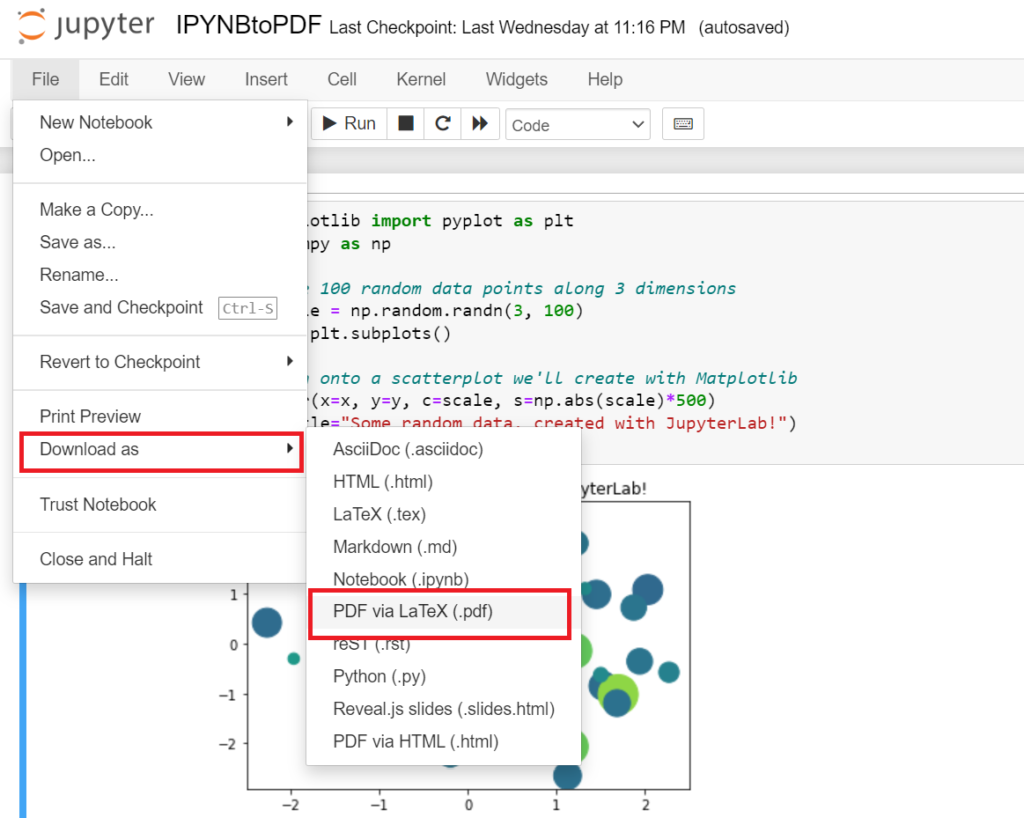
Next, the new tab will be opened in your browser for further processing
If you are downloading pdf for the first time from this option, there will be a lot of packages it will ask you to install, starting from this:
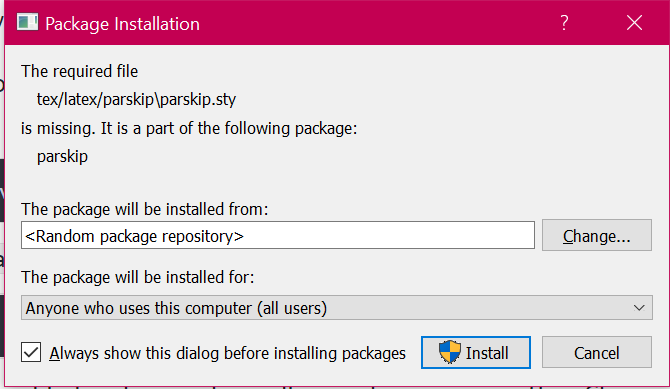
Install all of them, it may take 4-5 mins.
After installation, the terminal will have a success message like this:

Right after the message, your pdf will be downloaded through your notebook tab.

Second Method
Here, we are downloading the pdf with nbconvert.
nbconvert is a command line tool.
Type in your cmd,
pip install nbconvertThis command will check if your system has nbconvert, if it hasn’t, the command will anyways download it.
And the following command will simply convert your ipynb to pdf.
jupyter nbconvert --to pdf filename.ipynbThe file’s location will be the same folder as your notebook.
Note: If you want to convert the notebook to .html, to make it available offline, you can run the same command, just replace pdf with html as,
jupyter nbconvert --to html filename.ipynbThird Method
Another smart way to convert IPYNB to PDF is to print the notebook and when the printing interface opens, simply save it as PDF.
This is a straightforward and smart way to convert IPYNB to PDF.

Follow the path, File->Print Preview, and preview to file
Now press Ctrl+P.
The printing interface will open up. If the printer is selected already, from the same dropdown, select Save as PDF.
Your PDF is ready.
However, if we compare PDFs with Save as PDF and through the notebook’s functions, both are readable, but one with Jupyter’s functions is slightly more zoomed and like a proper paper with filename and last modified date.
Fourth Method
It’s very easy, open your browser, search google colab, click on the first link, upload your ipynb file, click on the file, then click on print. Click here to directly open google colab.
This method is the easiest one but the problem is that pdf generated will not look similar to the ipynb file.
Thank you, we have successfully completed all methods to convert ipynb to pdf.
Also Read:
- You Can Now Run AI Fully Offline on Your Phone — Google’s Gemma 4 Just Changed Everything
- I Built a 24×7 AI Blogging System for WordPress Using Python (Free) — Full Code Inside
- This Reddit User “Hacked” AI With Simple Tricks… And The Results Are Insane
- One “rm -rf” Command Almost Wiped Out $100 Million Worth of Toy Story 2
- How to Make Money with ChatGPT in 2026: A Real Guide That Still Works
- PicoClaw vs OpenClaw: The Tiny AI That Could Replace Powerful AI Agents
- Oracle Layoffs 2026: People Woke Up to an Email… and Lost Their Jobs Instantly
- X’s New Video Update Is Breaking a Basic Feature — And Users Are Not Happy
- The Most Shocking Military Tech Yet: Robot Soldiers That Could Change Warfare Forever
- Sora Shutdown: The Reality Check That Shook AI Video — And What Comes Next
- Aya Expanse supports multiple languages for diverse global applications
- Alibaba releases Page Agent on GitHub for public access
- Google Sheets Gemini reaches new levels of performance and accuracy
- Artificial intelligence boosts cardiac care in rural Australian communities
- NVIDIA GTC 2026 Offers Insights into Future Artificial Intelligence Developments
- Google DeepMind Updates Satellite Embedding Dataset with 2025 Data
- Enhancing hierarchical instruction in advanced large language models
- Meta supports community development near its data centers through grants
- Exploring the world of underwater robotics through coding techniques
- ABB Robotics partners with NVIDIA for large scale physical AI solutions
- Why All AI Models Are Slowly Becoming the Same Model
- Aam Aadmi vs Corrupt System: How ChatGPT Helped One Guy Expose Govt Fraud, The Story: “Ravi and The Missing Light Pole”
- ChatGPT Asked a person to commit suicide to solve the problem
- Viral Moment: China’s AgiBot X2 Makes History With World’s First Webster Backflip
- Terminator Rising: Albania Hands Power to AI, Echoing a Nightmare of Human Extinction
- What Is Albania’s World-First AI-Generated Minister and How Does It Work?
- Does ChatGPT believe in God? ChatGPT’s Personal Opinion
- ChatGPT vs Human: The Breath-Holding Chat That Ends in “System Failure”
- What Is Vibe Coding? The Future of No-Code Programming and Its Impact on Software Developers
- Struggling to Generate Ghibli-Style AI Images? Here’s the Real Working Tool That Others Won’t Tell You About!