Introduction
Hello friends, this is the article that gives an idea of how to get weather forecast using Python and the code of how to generate the weather report. The weather has become a very important aspect of our day-to-day activities. Our daily activities are mostly dependent on how the weather outside. Whether it’s cloudy, raining, or extremely hot or cold weather report gives us information about it. As we leave the house unexpectedly, it starts raining. The ‘weather forecast report ‘ helps us to know what would be today’s weather forecast to solve these problems.
This is a very simple and interesting code for beginners. It helps us to get the weather report by writing simple lines of code in python. The comments provided in this help us to understand the code line by line.
You can check our website for more articles related to python and its projects.
If you want only code, please go to the bottom of the page. Copy the code from there using the copy button.
1. Starting with the import function
from bs4 import BeautifulSoup
import requests
Here we have imported the Beautiful Soup library from the package(bs4) and requests module. The requests module helps to integrate your Python programs with web services. The Beautiful Soup module is designed to make screen-scraping get done quickly.
2. Setting User-Agent
headers = {'User-Agent': 'Mozilla/5.0 (Windows NT 10.0; Win64; x64) AppleWebKit/537.36 (KHTML, like Gecko) Chrome/58.0.3029.110 Safari/537.3'}The User-Agent request header is a character string. It lets servers and network peers identify the application, operating system, vendor, and/or version of the requesting user agent.
3. Requesting information from the URL
res=requests.get(f'https://www.google.com/search?q={city}&oq={city}&aqs=chrome.0. i635i39l2j0l4j46j690.6128j1j7&sourceid=chrome&ie=UTF-8',headers=headers)
The request function allows you to get the information from the URL and store it in the object i.e res.
3. Using the soup function
soup = BeautifulSoup(res.text,'html.parser')
We use BeautifulSoup to navigate our website and extract the data and store it in soup.
4. Extracting the information
location =  soup.select('#wob_loc')[0].getText().strip()
time =  soup.select('#wob_dts')[0].getText().strip()
info = soup.select('#wob_dc')[0].getText().strip()
weather = soup.select('#wob_tm')[0].getText().strip()
Here we can extract the information about location, time, info, and weather. It can be done by removing all the extra spaces with the help of the ‘strip’ function.
4. Enter the data to get the weather report
print("enter the city name")
city=input()
city=city+" weather"
weather(city)
Enter the city name and pass the city concatenated with the weather. It is passed to the weather function to extract the weather information of that particular city.
Complete Code to Get weather forecast using Python
#Weather report
#Importing Beautifulsoup Library
from bs4 import BeautifulSoup
#importing requests module
import requests

#header user agent is a string allows the server to identify the O.S and application
headers = {'User-Agent': 'Mozilla/5.0 (Windows NT 10.0; Win64; x64) AppleWebKit/537.36' (KHTML, like Gecko) Chrome/58.0.3029.110 Safari/537.3'}
#defining the weather function

def weather(city):
# Replaces the space with + operator
city=city.replace(" ","+")
#requests and get function to get the information from the URL provided
res=requests.get(f'https://www.google.com/search?q={city}&oq={city}’
                f'&aqs=chrome.0.35i39l2j0l4j46j69i60.6128j1j7&sourceid='
                       f'chrome&ie=UTF-8',headers=headers)
#searches the information from google
    print("Searching in google......\n")
#Navigates on that particular website ,extract and store the data in soup object
    soup = BeautifulSoup(res.text,'html.parser')
#gets the information of location
    location = soup.select('#wob_loc')[0].getText().strip()
#gets the information of time
    time = soup.select('#wob_dts')[0].getText().strip()
#gets the desired information
    info = soup.select('#wob_dc')[0].getText().strip()
#gets the weather information
    weather = soup.select('#wob_tm')[0].getText().strip()

#prints location
    print(location)
#prints time
    print(time)
#prints info
    print(info)
#prints the weather in degree celcius
    print(weather+"°C")

#enter the city name
print("enter the city name")
city=input()

#Concatenating the city name and weather
city=city+" weather"

#passing the city object to weather function
weather(city)
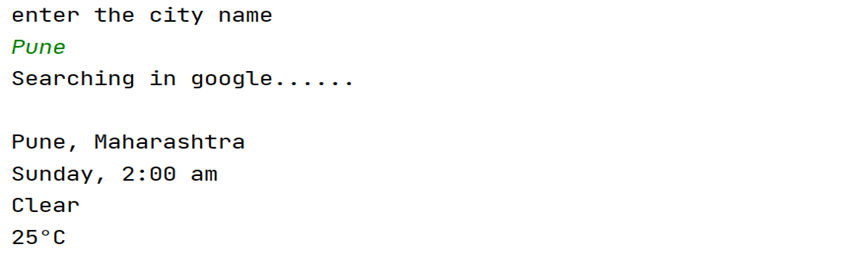
Output
Thank you for reading our article.
Also Read
- Aya Expanse supports multiple languages for diverse global applications
- Alibaba releases Page Agent on GitHub for public access
- Google Sheets Gemini reaches new levels of performance and accuracy
- Artificial intelligence boosts cardiac care in rural Australian communities
- NVIDIA GTC 2026 Offers Insights into Future Artificial Intelligence Developments
- Google DeepMind Updates Satellite Embedding Dataset with 2025 Data
- Enhancing hierarchical instruction in advanced large language models
- Meta supports community development near its data centers through grants
- Exploring the world of underwater robotics through coding techniques
- ABB Robotics partners with NVIDIA for large scale physical AI solutions
- Why All AI Models Are Slowly Becoming the Same Model
- Aam Aadmi vs Corrupt System: How ChatGPT Helped One Guy Expose Govt Fraud, The Story: “Ravi and The Missing Light Pole”
- ChatGPT Asked a person to commit suicide to solve the problem
- Viral Moment: China’s AgiBot X2 Makes History With World’s First Webster Backflip
- Terminator Rising: Albania Hands Power to AI, Echoing a Nightmare of Human Extinction
- What Is Albania’s World-First AI-Generated Minister and How Does It Work?
- Does ChatGPT believe in God? ChatGPT’s Personal Opinion
- ChatGPT vs Human: The Breath-Holding Chat That Ends in “System Failure”
- What Is Vibe Coding? The Future of No-Code Programming and Its Impact on Software Developers
- Struggling to Generate Ghibli-Style AI Images? Here’s the Real Working Tool That Others Won’t Tell You About!
- ChatGPT vs DeepSeek: Who is the winner?
- People are becoming AI Engineer with this free course in 2025: Here is how to join this…
- Apply to Google’s Student Training in Engineering Program (STEP) Intern, 2025
- Self-Driving Car Saves Falling Pedestrian, Showcases Promise of Autonomous Technology
- Instant Karma: Employer Fires Tech Team with AI, Faces Backlash on LinkedIn While Seeking New Developers