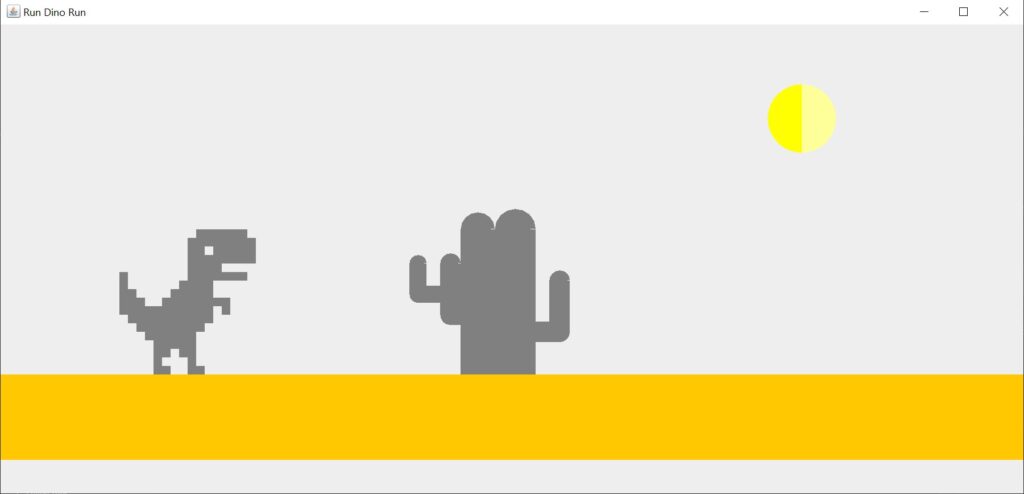
In this article, we will create the famous Chrome Dino Game in Java with Swing. We all have played the Dino game in the browser when the internet goes off. It’s a simple game where the player must keep the dinosaur safe from hitting obstacles by jumping over them.
Features
- The dinosaur can jump by pressing the Enter key.
- When the game is over, the player can restart it by pressing the Space bar key.
Code for Dino Game in Java
Create a folder for the project with a name of your choice. Create a file within this folder with the name dino.java. Please copy and paste the below code and run it.
import java.awt.Color;
import java.awt.Dimension;
import java.awt.Font;
import java.awt.Frame;
import java.awt.Graphics;
import java.awt.Graphics2D;
import java.awt.event.ActionEvent;
import java.awt.event.ActionListener;
import java.awt.event.KeyEvent;
import java.awt.event.WindowAdapter;
import java.awt.event.WindowEvent;
import java.util.ArrayList;
import java.util.List;
import java.util.Random;
import javax.swing.AbstractAction;
import javax.swing.ActionMap;
import javax.swing.InputMap;
import javax.swing.JPanel;
import javax.swing.KeyStroke;
import javax.swing.Timer;
import java.awt.event.KeyListener;

class Game extends Frame implements KeyListener{
	final int D_W = 1200;
	final int D_H = 550;
	static int unit = 10;
	Color colorDinosaur = Color.GRAY;
	Color colorGameOver1 = Color.black;
	Color colorGameOver2 = Color.yellow;
	Color colorCactus1 = Color.gray;
	Color colorCactus2 = Color.gray;
	int jump = 0;
	int jumpY = 0;
	int y = 0;
	boolean onEnterPresses = false;
	boolean down = false;
	List<MyGraph> myGraphs = new ArrayList<>();
	int currentDinosaurX = 0;
	int currentDinosaurY = 0;
	boolean gameOver = false;
	DrawPanel drawPanel = new DrawPanel();
	public static  void main(String args[]) {
		new Game();
	}

	public Game() {
		super("Run Dino Run");
		setSize(1200, 550); // set the size of the window
		setVisible(true);
		addWindowListener(new WindowAdapter() {
			public void windowClosing(WindowEvent e) {
				dispose();
				System.exit(0);
			}
		});

		addKeyListener(this);
		initCactusG();

		ActionListener listener = new ActionListener() {
			public void actionPerformed(ActionEvent e) {
				if (!gameOver) {
					if (jump >= D_W) {
						jump = 0;
						initCactusG();
						drawPanel.repaint();
					} else {
						jump += 10;
						drawPanel.repaint();
					}
				}
			}
		};

		Timer timer = new javax.swing.Timer(40, listener);
		timer.start();
		ActionListener listenerD = new ActionListener() {
			public void actionPerformed(ActionEvent e) {
				if (!gameOver) {
					if (onEnterPresses) {
						if (down) {
							jumpY -= 20;
						} else {
							jumpY += 20;
						}
					}
					if (jumpY >= 280) {
						down = true;
					}
					if (jumpY <= 0) {
						onEnterPresses = false;
						down = false;
						jumpY = 0;
					}
				}
			}
		};
		Timer timerD = new javax.swing.Timer(80, listenerD);
		timerD.start();
		add(drawPanel);
		pack();
		// setDefaultCloseOperation(EXIT_ON_CLOSE);
		setLocationRelativeTo(null);
		setVisible(true);
	}

	// create the cactus on random positions
	private void initCactusG() {
		Random rr = new Random();
		int nbr = 2;// rr.nextInt(2)+1 ;;
		int x_ = 10;
		int y_ = 100;
		int h_ = 60;
		int p_ = 10;
		myGraphs = new ArrayList<Game.MyGraph>();
		for (int it = 0; it < nbr; it++) {
			Random r = new Random();
			int step = r.nextInt(10) + 1;
			MyGraph myGraph = new MyGraph();
			myGraph.x_ = x_ * 30 + step * 10 + 600;
			myGraph.h_ = 10 + (6 * step) + 2;
			myGraph.y_ = 300 - h_;
			myGraph.p_ = 8 + step / 2;
			myGraphs.add(myGraph);
		}
	}

	// draw the cactus
	private void drawCactus(Graphics g) {
		int x = 0;
		int y = 0;
		int h = 0;
		int p = 0;
		for (MyGraph myGraph : myGraphs) {
			x = myGraph.x_;
			h = myGraph.h_;
			y = myGraph.y_;
			p = myGraph.p_;
			int maxH = 180;
			int i = p * 2 + 40;
			int j = p * 2 + 40;
			int y1 = y + 40;
			int y2 = y + 60;
			if (x + j - jump < 0) {
				jump = 0;
			}
			draw(g, x - i - jump, y1, h, p);
			draw(g, x - jump, y, maxH, p * 2);
			draw(g, x + j - jump, y2, h, p);
			drow2(g, x - jump, h, p, i, j, y1, y2);
		}
	}

	// on game over draw the game over text
	private void gameOver(Graphics g) {
		Graphics2D graph = (Graphics2D) g;
		graph.setPaint(colorGameOver1);
		graph.setFont(new Font("MV Boli", 20, 50));
		graph.drawString("Game Over", 550, 150);

		//restart
		Graphics2D graph1 = (Graphics2D) g;
		graph1.setPaint(colorGameOver1);
		graph1.setFont(new Font("MV Boli", 20, 50));
		graph1.drawString("Press Space key to restart!!", 350, 250);
	}

	// restart the game
	private void restartGame(Graphics g) {
		new Game();
	}

	// draw the sun on the sky
	private void drawSun(Graphics g) {
		Graphics2D sun1 = (Graphics2D) g;
		sun1.setPaint(new Color(255, 255, 0));
		sun1.fillArc(900, 70, 80, 80, 90, 180);
		Graphics2D sun2 = (Graphics2D) g;
		sun2.setPaint(new Color(255, 255, 153));
		sun2.fillArc(900, 70, 80, 80, 270, 180);
	}

	// draw the cactus
	private void drow2(Graphics g, int x, int h, int p, int i, int j, int y1, int y2) {
		Graphics2D gsds = (Graphics2D) g;
		gsds.setPaint(colorCactus1);
		gsds.fillRect(x - i + p, y1 + h, i, p);
		Graphics2D gsdds = (Graphics2D) g;
		gsdds.setPaint(colorCactus2);
		gsdds.fillRect(x - i + 2 * p, y1 + h - p, i - 2 * p, p);
		Graphics2D gsd2 = (Graphics2D) g;
		gsd2.setPaint(colorCactus2);
		gsd2.fillRect(x + p * 2, y2 + h, j - p, p);
		Graphics2D gsd3 = (Graphics2D) g;
		gsd3.setPaint(colorCactus1);
		gsd3.fillRect(x + p * 4, y2 + h - p, j - 4 * p, p);
	}

	// draw the surface
	private void drawSol(Graphics g, int x, int y, int maxH) {
		Graphics2D sol = (Graphics2D) g;
		sol.setPaint(Color.orange);
		sol.fillRect(0, y + maxH - 20, 1700, 100);
	}

	// draw the dinausor
	private void drawDinausor(Graphics g, int y) {
		int xDinausor = 180;
		int step = 1;
		g.setColor(colorDinosaur);
		currentDinosaurX = xDinausor;
		currentDinosaurY = y;
		drawRaw(g, xDinausor, y, 2, 1);
		drawRaw(g, xDinausor + 4 * unit, y, 2, 1);
		drawRaw(g, xDinausor, y - step * unit, 1, 1);
		drawRaw(g, xDinausor + 4 * unit, y - step * unit, 1, 1);
		step++;
		drawRaw(g, xDinausor, y - step * unit, 2, 1);
		drawRaw(g, xDinausor + 3 * unit, y - step * unit, 2, 1);
		step++;
		drawRaw(g, xDinausor, y - step * unit, 5, 1);
		step++;
		drawRaw(g, xDinausor - unit, y - step * unit, 6, 1);
		step++;
		drawRaw(g, xDinausor - 2 * unit, y - step * unit, 8, 1);
		step++;
		drawRaw(g, xDinausor - 3 * unit, y - step * unit, 10, 1);
		step++;
		drawRaw(g, xDinausor - 4 * unit, y - step * unit, 11, 1);
		drawRaw(g, xDinausor + (11 + 1 - 4) * unit, y - step * unit, 1, 1);
		step++;
		drawRaw(g, xDinausor - 4 * unit, y - step * unit, 3, 1);
		drawRaw(g, xDinausor + (5 - 4) * unit, y - step * unit, 8, 1);
		step++;
		drawRaw(g, xDinausor - 4 * unit, y - step * unit, 2, 1);
		drawRaw(g, xDinausor + (6 - 4) * unit, y - step * unit, 5, 1);
		step++;
		drawRaw(g, xDinausor - 4 * unit, y - step * unit, 1, 1);
		drawRaw(g, xDinausor + (7 - 4) * unit, y - step * unit, 4, 1);
		step++;
		drawRaw(g, xDinausor - 4 * unit, y - step * unit, 1, 1);
		drawRaw(g, xDinausor + (8 - 4) * unit, y - step * unit, 7, 1);
		step++;
		drawRaw(g, xDinausor + (8 - 4) * unit, y - step * unit, 4, 1);
		step++;
		drawRaw(g, xDinausor + (8 - 4) * unit, y - step * unit, 8, 1);
		step++;
		drawRaw(g, xDinausor + (8 - 4) * unit, y - step * unit, 2, 1);
		drawRaw(g, xDinausor + (11 - 4) * unit, y - step * unit, 5, 1);
		step++;
		drawRaw(g, xDinausor + (8 - 4) * unit, y - step * unit, 8, 1);
		step++;
		drawRaw(g, xDinausor + (9 - 4) * unit, y - step * unit, 6, 1);
		step++;
	}

	private void drawRaw(Graphics g, int Dinausor, int y, int w, int h) {
		Graphics2D sun16 = (Graphics2D) g;
		sun16.fillRect(Dinausor, y, w * unit, h * unit);
	}

	private void draw(Graphics g, int x, int y, int h, int p) {
		if (x <= currentDinosaurX && x + p >= currentDinosaurX && y <= currentDinosaurY) {
			gameOver(g);
			gameOver = true;
			return;
		}
		Graphics2D gcd = (Graphics2D) g;
		// Green 0 -204- 0
		gcd.setPaint(colorCactus1);
		gcd.fillRect(x, y, p, h);
		Graphics2D gsd = (Graphics2D) g;
		// Very dark green 0 -102- 0
		gsd.setPaint(colorCactus2);
		gsd.fillRect(x + p, y, p, h);
		Graphics2D gssd = (Graphics2D) g;
		// Very dark green 0 -102- 0
		gssd.setPaint(colorCactus2);
		gssd.fillArc(x, y - p, p * 2, p * 2, 1, 90);
		Graphics2D gzssd = (Graphics2D) g;
		gzssd.setPaint(colorCactus1);
		gzssd.fillArc(x, y - p, p * 2, p * 2, 90, 90);
		Graphics2D ghssd = (Graphics2D) g;
		ghssd.setPaint(colorCactus1);
		ghssd.fillArc(x, y + h - p, p * 2, p * 2, 180, 90);
		Graphics2D ghzssd = (Graphics2D) g;
		ghzssd.setPaint(colorCactus2);
		ghzssd.fillArc(x, y + h - p, p * 2, p * 2, 270, 90);
	}

	private class DrawPanel extends JPanel {
		public DrawPanel() {
			MoveAction action = new MoveAction("onEnter");
			String ACTION_KEY = "onEnter";
			KeyStroke W = KeyStroke.getKeyStroke(KeyEvent.VK_ENTER, 0);
			InputMap inputMap = getInputMap(WHEN_IN_FOCUSED_WINDOW);
			inputMap.put(W, ACTION_KEY);
			ActionMap actionMap = getActionMap();
			actionMap.put(ACTION_KEY, action);
		}
		protected void paintComponent(Graphics g) {
			super.paintComponent(g);
			drawCactus(g);
			drawSun(g);
			drawSol(g, 100, 250, 180);
			drawDinausor(g, 400 - jumpY);
			if (gameOver) {
				gameOver(g);
			}
		}
		public Dimension getPreferredSize() {
			return new Dimension(D_W, D_H);
		}
	}

	private class MyGraph {
		int x_ = 10;
		int y_ = 100;
		int h_ = 60;
		int p_ = 10;
	}

	class MoveAction extends AbstractAction {
		public MoveAction(String name) {
			putValue(NAME, name);
		}
		public void actionPerformed(ActionEvent actionEvent) {
			onEnterPresses = true;
			drawPanel.repaint();
		}
	}

	@Override
	public void keyTyped(KeyEvent e) {
		// TODO Auto-generated method stub
	}

	@Override
	public void keyPressed(KeyEvent e) {
		if(e.getKeyCode() == KeyEvent.VK_SPACE) {
			if(gameOver){
				gameOver = false;
				restartGame(getGraphics());
			}
		}
	}

	@Override
	public void keyReleased(KeyEvent e) {
		// TODO Auto-generated method stub
	}
}
Output for Dino Game in Java
Image Output:
Video Output:
Conclusion
This ends our article on Dino Game in Java. I hope this was helpful and easy to follow. You must also check these projects to get a good hold of building applications in Java.
Thank you for visiting our website.
Also Read:
- Dino Game in Java
- Java Games Code | Copy And Paste
- Supply Chain Management System in Java
- Survey Management System In Java
- Phone Book in Java
- Email Application in Java
- Inventory Management System Project in Java
- Blood Bank Management System Project in Java
- Electricity Bill Management System Project in Java
- CGPA Calculator App In Java
- Chat Application in Java
- 100+ Java Projects for Beginners 2023
- Airline Reservation System Project in Java
- Password and Notes Manager in Java
- GUI Number Guessing Game in Java
- How to create Notepad in Java?
- Memory Game in Java
- Simple Car Race Game in Java
- ATM program in Java
- Drawing Application In Java
- Tetris Game in Java
- Pong Game in Java
- Hospital Management System Project in Java
- Ludo Game in Java
- Restaurant Management System Project in Java
- Flappy Bird Game in Java
- ATM Simulator In Java
- Brick Breaker Game in Java
- Best Java Roadmap for Beginners 2023
- Snake Game in Java