Hello everyone, in this article, we will discuss how to create a simple Music player using HTML, CSS, and JavaScript. First, we will see the folder structure, and later I will show the code for the music player.
We are not attaching any cloud, songs will be played from local memory only.
Folder Structure
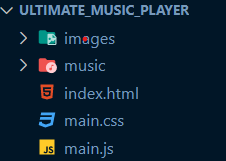
This is our folder structure,
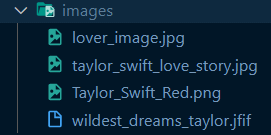
The images folder contains all the images for the song cover.
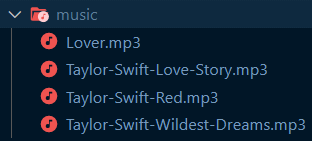
The music folder contains music.
index.html contains our Html code.
main.css contains styling for our web page.
main.js contains all the logic.
HTML code:
<!DOCTYPE html>
<html>
<head>
    <meta charset='utf-8'>
    <meta http-equiv='X-UA-Compatible' content='IE=edge'>
    <title>Music Player: CopyAssignment</title>
    <meta name='viewport' content='width=device-width, initial-scale=1'>
    <link rel="stylesheet" href="https://use.fontawesome.com/releases/v5.12.1/css/all.css" crossorigin="anonymous">
    <link rel='stylesheet' type='text/css' media='screen' href='main.css'>

</head>
<body>

    <div class="main_div">

        <div class="current_song"></div>
            <img src="" id="cover_photo"/>
            <h1 id="title"></h1>
            <p id="singer"></p>
            <button id="prev"><i class="fas fa-backward fa-3x prev"></i></button>
            <button id="play"><i class="fas fa-play fa-3x prev"></i></button>
            <button id="next"><i class="fas fa-forward fa-3x prev"></i></button>
        </div>

        <div class="songs">

        </div>
    </div>

    <script src='main.js'></script>

</body>
</html>
CSS code:
body{
    background: linear-gradient(45deg, black, #282C35);
    height: 100%;
    margin: 0;
    background-repeat: no-repeat;
    background-attachment: fixed;
    background-color: rgba(255, 255, 255, .15);
    backdrop-filter: blur(5px);
}

h1{
    color: whitesmoke;
    position: absolute;
    top: 500px;
    left: 300px;
}
p{
    color: whitesmoke;
}

img{
    width: 500px;
    height: 400px;
    position: absolute;
    left: 150px;
    top: 90px;
}
p{
    color: whitesmoke;
    position: absolute;
    top: 550px;
    left: 360px;
}
#prev{
    background-color: black;
    border: none;
    position: absolute;
    top: 600px;
    left: 280px;
}
#play{
    background-color: black;
    border: none;
    position: absolute;
    top: 600px;
    left: 370px;
}
#next{
    background-color: black;
    border: none;
    position: absolute;
    top: 600px;
    left: 440px;
}
.prev{
    color: whitesmoke;
    height: 5vh;
}
JavaScript code:
//getting all elements of html in js
let song_image = document.getElementById("cover_photo")
let song_title = document.getElementById("title")
let song_singer = document.getElementById("singer")
let song_play = document.getElementById("play")
let song_prev = document.getElementById("prev")
let song_next = document.getElementById("next")


console.log(song_play)


//creating song object list
let songs_list = [
    {
        name : 'Lover',
        Image : 'images/lover_image.jpg',
        Song : 'music/Lover.mp3',
        Singer : 'Diljit'
    },
    {
        name : 'Love Story',
        Image : 'images/taylor_swift_love_story.jpg',
        Song : 'music/Taylor-Swift-Love-Story.mp3',
        Singer : 'Taylor Swift'
    },
    {
        name : 'Red',
        Image : 'images/Taylor_Swift_Red.png',
        Song : 'music/Taylor-Swift-Red.mp3',
        Singer : 'Taylor Swift'
    },
    {
        name : 'Wildest Dreams',
        Image : 'images/wildest_dreams_taylor.jfif',
        Song : 'music/Taylor-Swift-Wildest-Dreams.mp3',
        Singer : 'Taylor Swift'
    }
]

//keeping track of which song is playing and if song is playing or not
let i=0;
let flag=false;


//showing song name and image on screen
var audio = new Audio(songs_list[i].Song);
song_image.src = songs_list[i].Image
song_title.innerHTML = songs_list[i].name
song_singer.innerHTML = songs_list[i].Singer

//function to play/pause song
song_play.addEventListener("click", function(){

    if(flag ===false){
        audio.play()
        flag=true;
        console.log(flag)
    }
    else{
        audio.pause()
        flag=false;
        console.log(flag)
    }
})

//function to play next song
song_next.addEventListener("click", function(){

    audio.pause()
    flag = false;
    i = i+1;
    if(i>=songs_list.length){

        i=0;
    }
    console.log(i)
    song_image.src = songs_list[i].Image
    song_singer.innerHTML = songs_list[i].Singer
    song_title.innerHTML = songs_list[i].name
    audio = new Audio(songs_list[i].Song)
    if(flag ===false){
        audio.play()
        flag=true;
        console.log(flag)
    }

})

//function to play previous song
song_prev.addEventListener("click", function(){

    audio.pause()
    flag = false;
    i = i-1;
    if(i<=0){
        i=songs_list.length-1;
        console.log(i)
    }
    song_image.src = songs_list[i].Image
    song_singer.innerHTML = songs_list[i].Singer
    song_title.innerHTML = songs_list[i].name
    audio = new Audio(songs_list[i].Song)
    if(flag ===false){
        audio.play()
        flag=true;
        console.log(flag)
    }


})
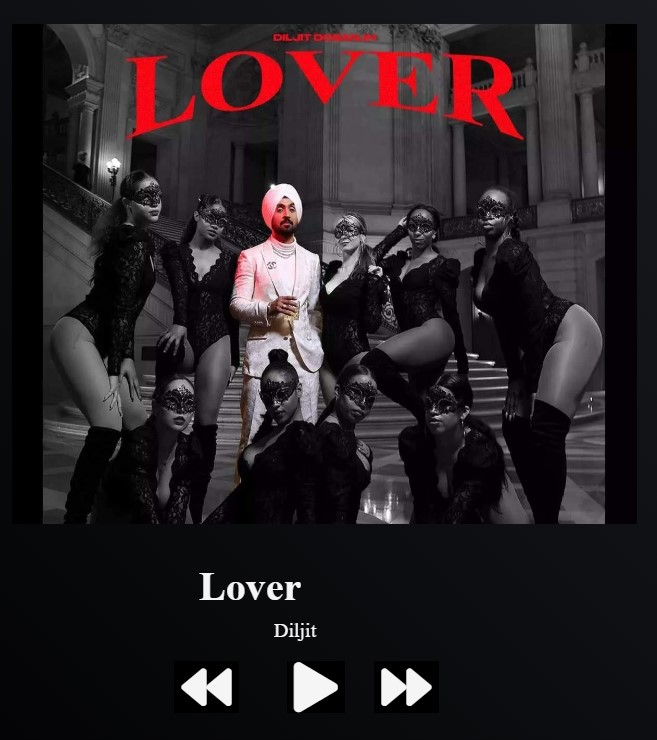
Output for Music player using HTML CSS and JavaScript:


Also Read:
- Aya Expanse supports multiple languages for diverse global applications
- Alibaba releases Page Agent on GitHub for public access
- Google Sheets Gemini reaches new levels of performance and accuracy
- Artificial intelligence boosts cardiac care in rural Australian communities
- NVIDIA GTC 2026 Offers Insights into Future Artificial Intelligence Developments
- Google DeepMind Updates Satellite Embedding Dataset with 2025 Data
- Enhancing hierarchical instruction in advanced large language models
- Meta supports community development near its data centers through grants
- Exploring the world of underwater robotics through coding techniques
- ABB Robotics partners with NVIDIA for large scale physical AI solutions
- Why All AI Models Are Slowly Becoming the Same Model
- Aam Aadmi vs Corrupt System: How ChatGPT Helped One Guy Expose Govt Fraud, The Story: “Ravi and The Missing Light Pole”
- ChatGPT Asked a person to commit suicide to solve the problem
- Viral Moment: China’s AgiBot X2 Makes History With World’s First Webster Backflip
- Terminator Rising: Albania Hands Power to AI, Echoing a Nightmare of Human Extinction
- What Is Albania’s World-First AI-Generated Minister and How Does It Work?
- Does ChatGPT believe in God? ChatGPT’s Personal Opinion
- ChatGPT vs Human: The Breath-Holding Chat That Ends in “System Failure”
- What Is Vibe Coding? The Future of No-Code Programming and Its Impact on Software Developers
- Struggling to Generate Ghibli-Style AI Images? Here’s the Real Working Tool That Others Won’t Tell You About!
- ChatGPT vs DeepSeek: Who is the winner?
- People are becoming AI Engineer with this free course in 2025: Here is how to join this…
- Apply to Google’s Student Training in Engineering Program (STEP) Intern, 2025
- Self-Driving Car Saves Falling Pedestrian, Showcases Promise of Autonomous Technology
- Instant Karma: Employer Fires Tech Team with AI, Faces Backlash on LinkedIn While Seeking New Developers
- LinkedIn’s COO Reveals the AI Interview Question That Could Land You the Job in 2025
- Elon Musk’s xAI Raises $6 Billion, Valued at $45 Billion
- Google Unveils Veo 2 and Imagen 3: A New Era of AI-Generated Content
- Imagination to Reality, Unlocking the Future: Genesis Physics Engine for 4D Simulation
- Simple Code to compare Speed of Python, Java, and C++?